Minimal hub and spoke
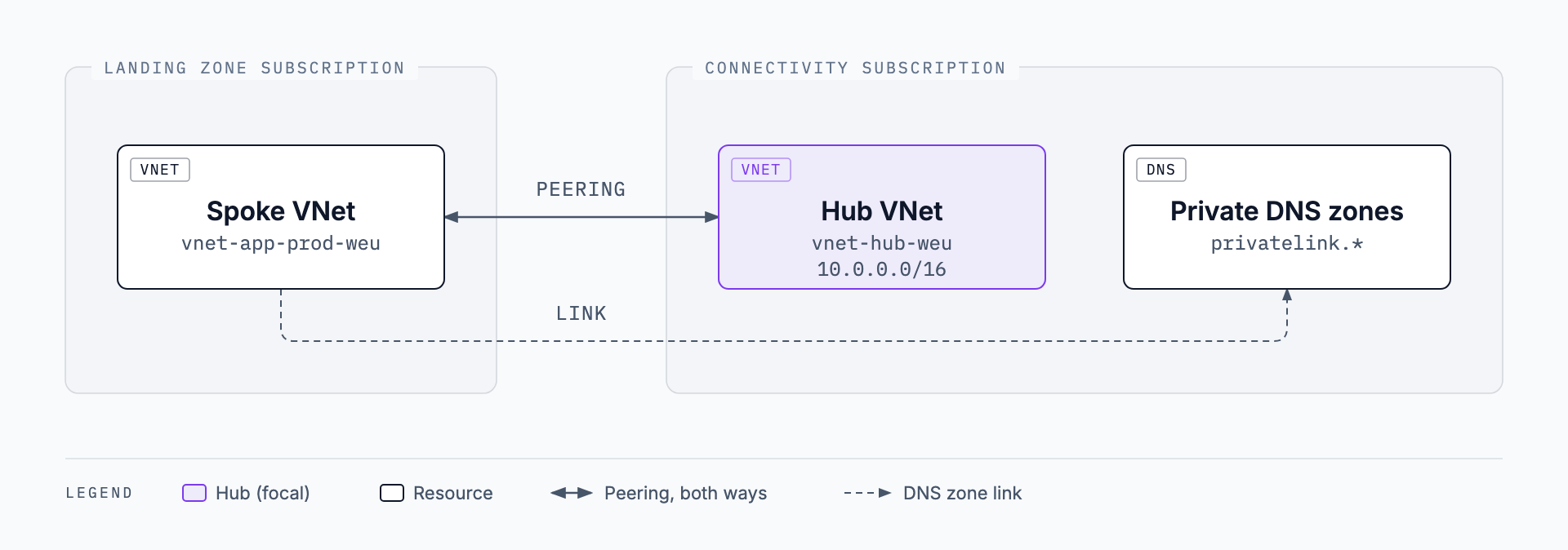
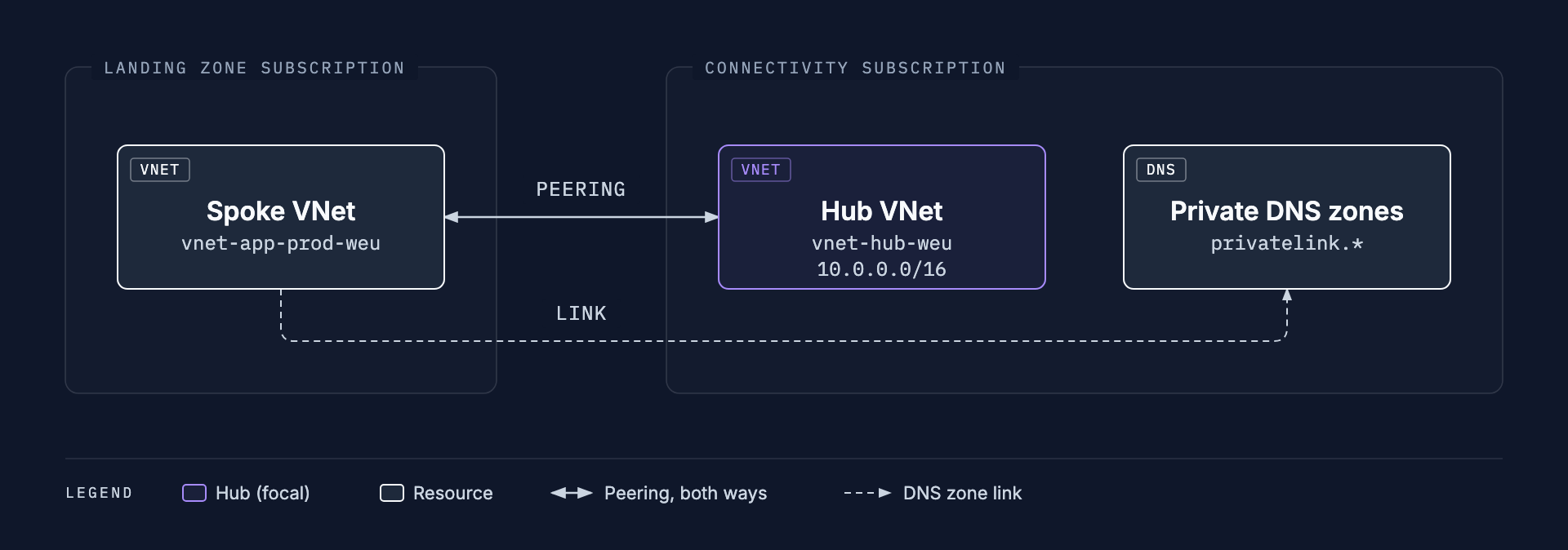
One hub virtual network in the connectivity subscription with central private link DNS, and nothing that bills by the hour. The reference environment NRIT operates runs this shape. Pick it when the workloads need private endpoints and spoke-to-spoke reachability through the hub, and nothing needs inspecting or reaching on-premises yet. Every other hub scenario starts from this one by turning a flag on.
Example: examples/connectivity/hub-spoke-minimal/.
What it deploys
| Resource | Module | Version |
|---|---|---|
rg-hub-weu |
Azure/avm-res-resources-resourcegroup/azurerm |
0.4.0 |
vnet-hub-weu, 10.0.0.0/16, and the private link DNS zones linked to it |
Azure/avm-ptn-alz-connectivity-hub-and-spoke-vnet/azurerm |
0.18.1 |
Module docs
Links point at the pinned version. The module examples are applied by the module's own CI on every release.
Not deployed: Azure Firewall, Bastion, both gateways, the private DNS resolver,
the DNS security policy, the NAT gateway, the DDoS plan. The module defaults
all of them to on and gates creation on the flag alone, so each is set
false explicitly in main.tf. Turn one on by flipping its flag and adding its
block.
Idle cost. The virtual network and the peerings are free. Each private DNS zone bills a fraction of a dollar a month plus queries.
The tree you add
live/platform/connectivity/
├── subscription.hcl                     # the connectivity subscription id
├── env.hcl                              # environment = "prod"
└── westeurope/
    ├── region.hcl
    └── caf-connectivity-hub/
        ├── terragrunt.hcl               # root include, depends on _foundation/landing-zones
        └── main.tf
The hub deploys into the connectivity subscription, which differs from the
management subscription that holds the state backend. subscription.hcl sets
it explicitly; root.hcl reads the backend subscription separately.
Before the first apply
- Place the connectivity subscription. Set
connectivity_subscription_idinlive/_foundation/landing-zones/main.tfand re-apply that unit, so the subscription sits under theconnectivitymanagement group and its policy. - Pair the DNS zones with the foundation.
private_dns_zoneson the hub must match the policy default values in the same foundation file, so the ALZDeploy-Private-DNS-Zonesassignments point at zones that exist. The example trims the module's ninety-zone catalogue to five; keep both halves in step whenever you add or drop a zone. - Link the spokes.
virtual_network_link_additional_virtual_networksis empty in the example. Add each spoke by the resource id its network unit derives, so workloads in that spoke resolve private endpoints.
Apply order
_foundation/landing-zones, then this unit, then the landing zones. The
dependencies block on the hub declares the first step; nothing reads an
output.
What people get wrong
- A spoke requests remote gateways. The hub has none, so a spoke peering
with
use_remote_gateways = true(the sub-vending module's default) fails. Every landing zone example sets itfalse. - Dropping a zone the policy still names. The deploy-if-not-exists assignment then creates private endpoints that resolve nowhere. Change the foundation first.
- Turning on
auto_registration_zone_enabled. Nothing registers VM hostnames here, and the zone costs the same as a used one.
About the cost figures
Fixed infrastructure only, list prices, one region, from the ALZ accelerator's scenario pages (US dollars, west US, 2026-04-02) and the Azure pricing pages. Data processing, log ingestion and DNS queries are on top and vary. The infracost gate on your pull request reports the figure for your region and currency before you apply.