Landing zone with a new subscription
The platform creates the subscription from a billing scope, names it, places it and gives it a budget, then the spoke network follows. Pick it when the MSP or the customer holds a billing account the platform may create subscriptions under: an Enterprise Agreement enrollment account, a Microsoft Customer Agreement invoice section, or a partner customer.
Example: examples/landing-zones/vend-subscription/.
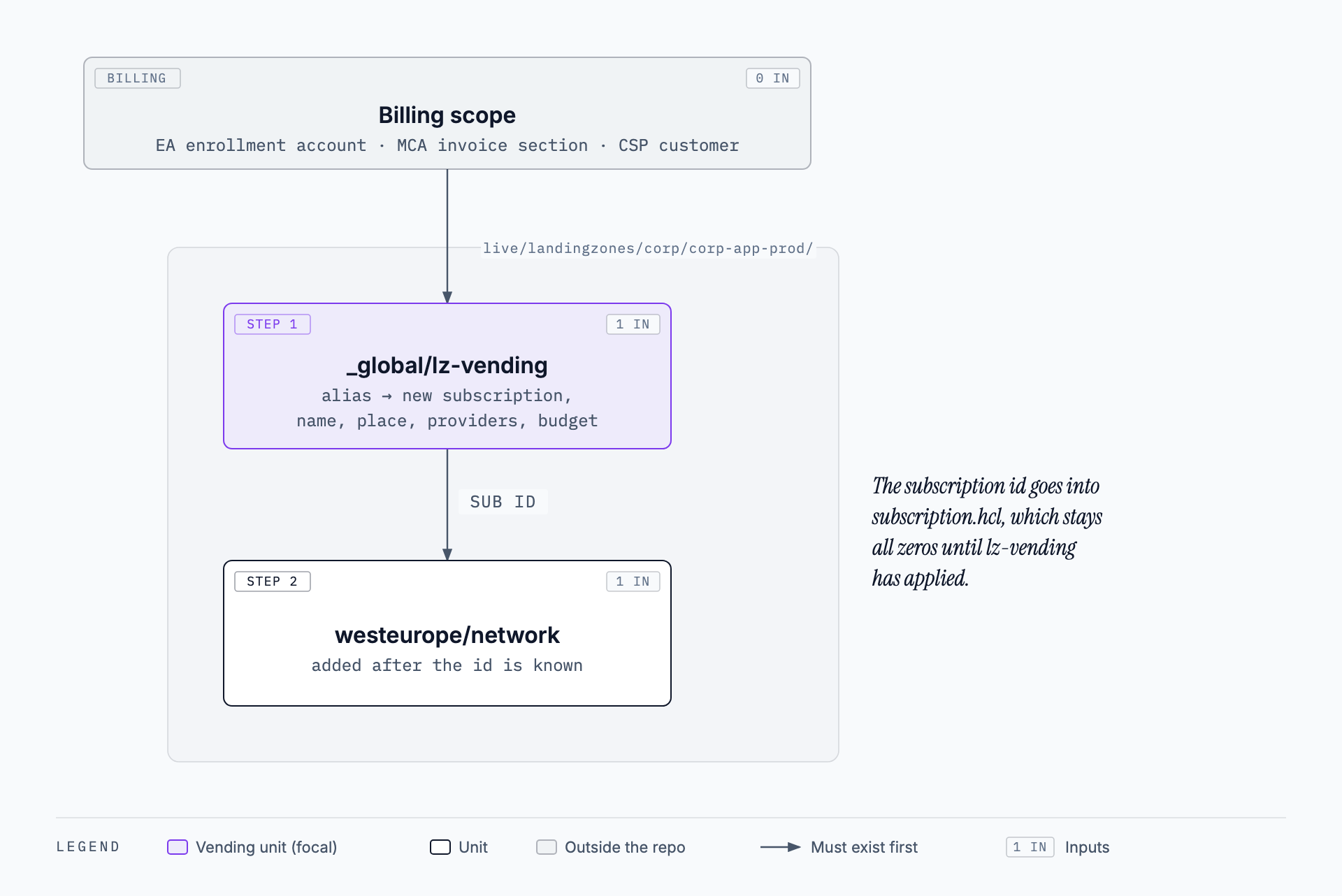
Two units, on purpose
| Unit | Owns | Module | Version |
|---|---|---|---|
_global/lz-vending/ |
The subscription: display name, placement under the management group, resource provider registration, the monthly budget. No network | Azure/avm-ptn-alz-sub-vending/azure |
0.3.4 |
westeurope/network/ |
The spoke: resource group, virtual network, subnets, the NSG, the hub connection, optionally the route table to a firewall | Azure/avm-ptn-alz-sub-vending/azure |
0.3.4 |
Module docs
Links point at the pinned version. The module examples are applied by the module's own CI on every release.
The same module, configured differently. Every subscription-level input is
fixed off in the network unit, so the two never contend for subscription state.
Each has its own state, so a subnet change never re-plans the placement, and
the placement unit is region-agnostic, which is why it sits under _global/
with a co-located region.hcl that only satisfies the root contract.
Identities and role assignments are deliberately not here. They belong to the workload unit that uses them, next to what they protect.
The tree you add
The same tree as the existing-subscription scenario, in two steps.
live/landingzones/corp/corp-app-prod/
├── subscription.hcl                       # all zeros until lz-vending has applied
├── env.hcl
├── _global/
│   ├── region.hcl
│   └── lz-vending/                        # step 1
│       ├── terragrunt.hcl
│       └── main.tf
└── westeurope/
    ├── region.hcl
    └── network/                           # step 2
        ├── terragrunt.hcl
        └── main.tf
- Vend. Add everything except
westeurope/network/, withsubscription.hclat the all-zero placeholder. Plan and applylz-vending. The subscription id is in the apply output and the portal. - Network. Put the id in
subscription.hcl, add the network unit, plan and apply. The providers for both units are pinned to that id from this point on.
The placeholder keeps the tree valid between the steps. Nothing plans against the all-zero subscription, because the network unit is not there yet.
Decisions in the example
- Alias and display name are the same string. The alias is the API-side
name and cannot change; the display name can. Keep both at
<archetype>-<purpose>-<environment>. subscription_workload = "Production".DevTestis cheaper for dev and test subscriptions and restricts what can run in them. Pick per subscription.- Subscription tags set here. On a new subscription the three
subscription-level tags (
businessunit,env,costcenter) start here, and the ALZ inherit-tag policy copies them down. This is the one place they belong. - The rest matches the adopt scenario: management group, providers, budget, no identities.
What the apply identity needs
Creating a subscription is a billing operation, not an ARM one. The bootstrap's apply identity holds Owner at the management group scope, which does not cover the billing scope. Grant it the subscription creator role on the enrollment account, invoice section or customer before the first plan:
| Billing | Role |
|---|---|
| Enterprise Agreement | Subscription creator on the enrollment account |
| Microsoft Customer Agreement | Azure subscription creator on the invoice section |
| Partner (CSP) | Admin agent in the partner tenant, and the customer must accept the Microsoft Customer Agreement |
Without it the plan succeeds and the apply fails with an authorization error on the alias.
The spoke
The example's spoke is one /24 with two subnets, each associated to one
network security group, because the ALZ policy Deny-Subnet-Without-Nsg
denies any subnet without one.
| Subnet | For |
|---|---|
snet-app-workload-prod-weu, /26 |
Private endpoints and anything without a delegation |
snet-app-appsvc-prod-weu, /26 |
App Service regional VNet integration: delegated to Microsoft.Web/serverFarms, shared with nothing else |
A Flex Consumption function app needs a third subnet delegated to
Microsoft.App/environments; the workload PR adds it when needed.
The hub connection is the only line that changes between connectivity scenarios:
| Hub | In main.tf |
|---|---|
| Hub and spoke (minimal or firewall) | hub_network_resource_id, hub_peering_enabled = true, use_remote_gateways = false because the hub has no gateway |
| Hub and spoke with firewall, egress inspected | Also route_table_enabled = true and route_table = { key_reference = "to_firewall" } on each subnet; the next hop is the firewall's first usable address, a literal by convention |
| Virtual WAN | The commented virtual hub locals and vwan_connection_enabled block instead of the hub virtual network locals and the peering lines, and the unit's dependencies pointed at caf-connectivity-vwan |
The hub's resource id is derived from the connectivity subscription id, the hub resource group and the hub name the hub unit uses, so it is known at plan time and reads no state. The connectivity subscription is not an ancestor of this folder, so its id is a literal to replace.
Set tags on the virtual network as well as on the resource group. The ALZ
inherit-tag policy copies them at run time, so a VNet with no tags in code
drifts on every plan.
Apply order
lz-vending on its own first; the subscription must exist before anything
pins a provider to it. Then network. Then the workload units.
What people get wrong
- Adding the network unit in step 1. Its providers pin to the all-zero subscription and the plan fails on authorization. Two pull requests, or one PR with two applies.
- Changing the alias later. It forces a new subscription. Rename through
subscription_display_nameonly. - A billing scope with the wrong case. The scope string is case sensitive.